A node canvas for AI, woven by your coding agent.
Wire 276 image, video, 3D and audio models into visual pipelines. Bring your own keys, pay providers at cost. Then point Claude Code, Codex or Cursor at it and watch the canvas build itself.
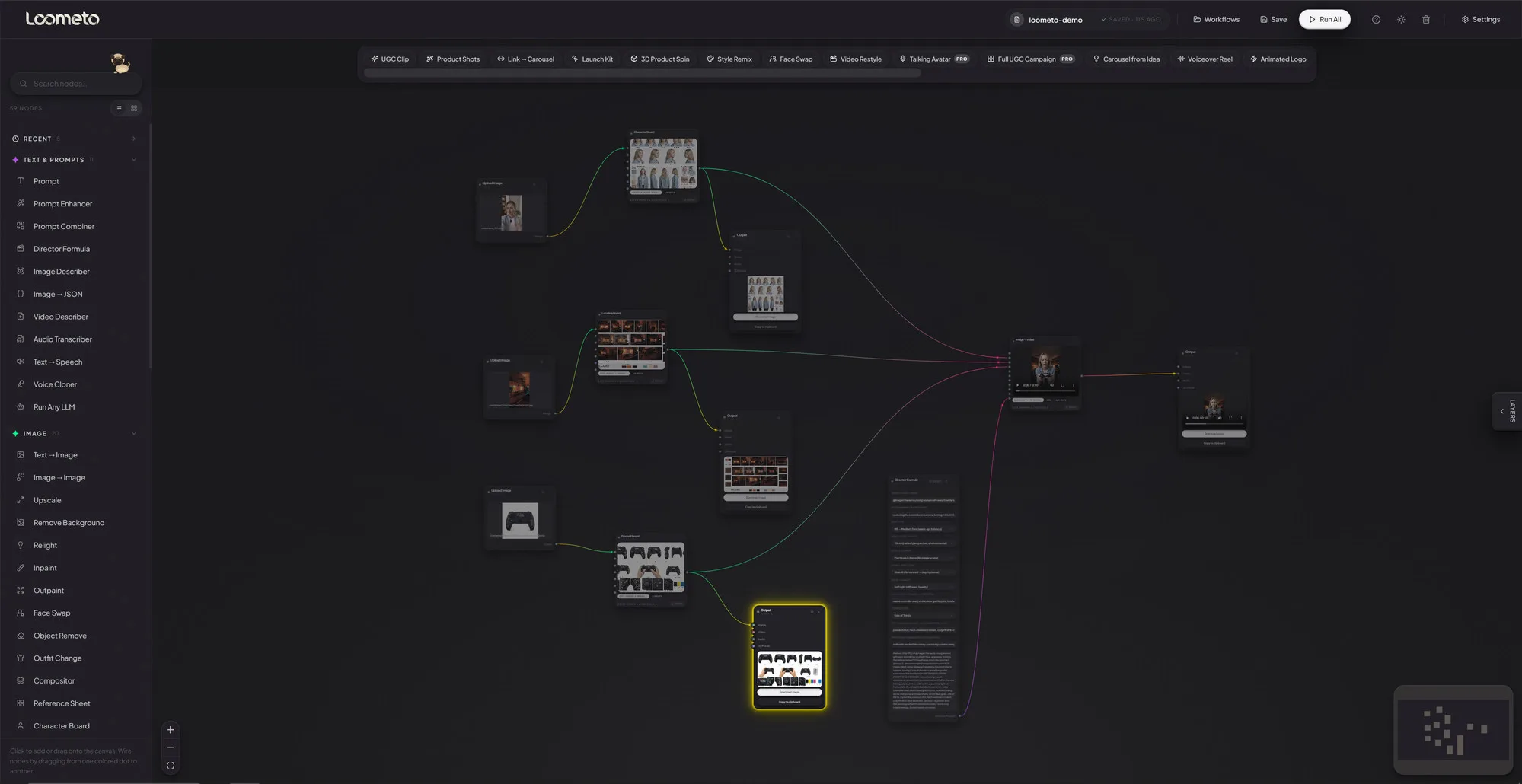
Five screens that explain the whole thing.
Every shot below is the actual app running locally. No mockups, no concept art.
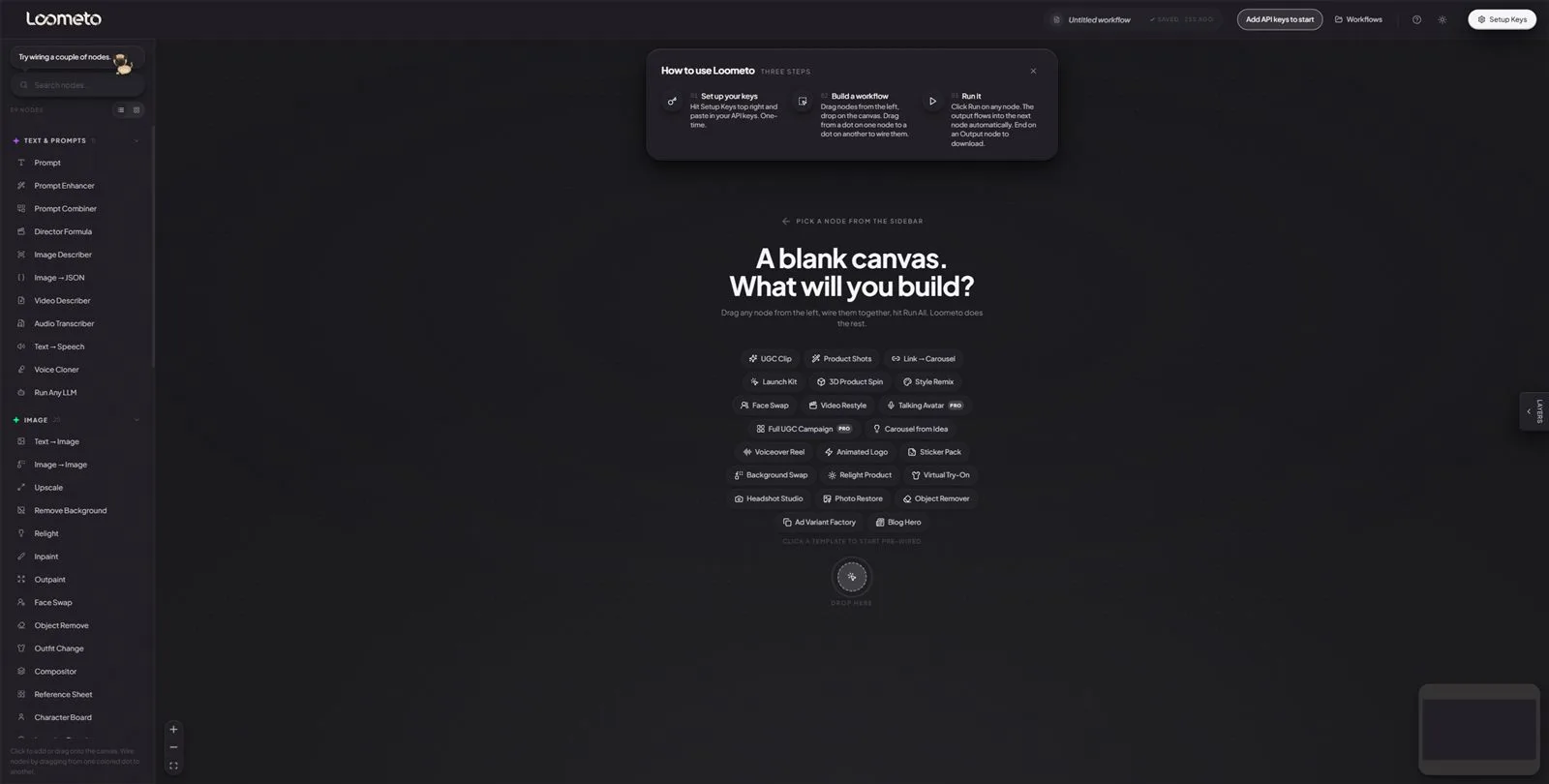
You're never staring at an empty grid.
Open Loometo and it teaches itself: a three-step explainer, every template one click away, and a search over all 57 nodes.
- Three steps, on screen. Set up keys, drag nodes, hit Run. The explainer card covers the entire learning curve.
- 22 templates as chips. UGC Clip, Launch Kit, 3D Product Spin, Headshot Studio… click one and a pre-wired pipeline lands on the canvas.
- Node search + grouped sidebar. Text & Prompts, Image, Video, Audio, 3D, Utility: every node one keystroke away.
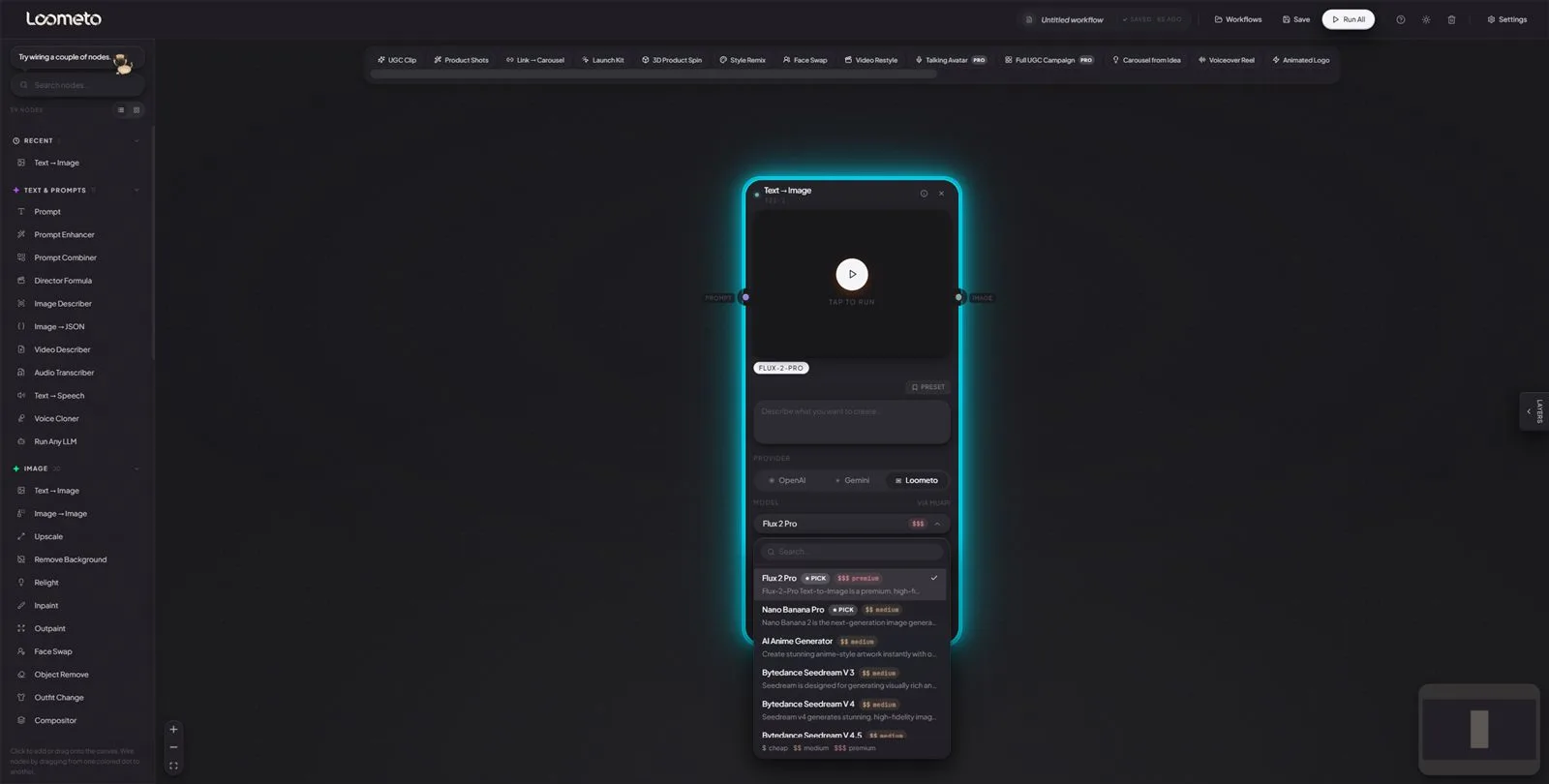
Every model, priced and ranked, inside the node.
No tab-switching to compare models. The picker is searchable, cost-labeled and curated, and the parameters below it are schema-driven, so you can never set a value the model rejects.
- ★ PICK badges. Curated recommendations per category, so newcomers land on the right model first try.
- $ / $$ / $$$ cost tiers on every entry (cheap, medium, premium) before you spend a cent.
- Provider pills + routing. OpenAI · Gemini · Loometo pills up top; the "VIA MUAPI" tag shows exactly which route your call takes.
- Schema-driven params. Aspect ratio, resolution, negative prompt: the dropdowns only offer values this exact model accepts.
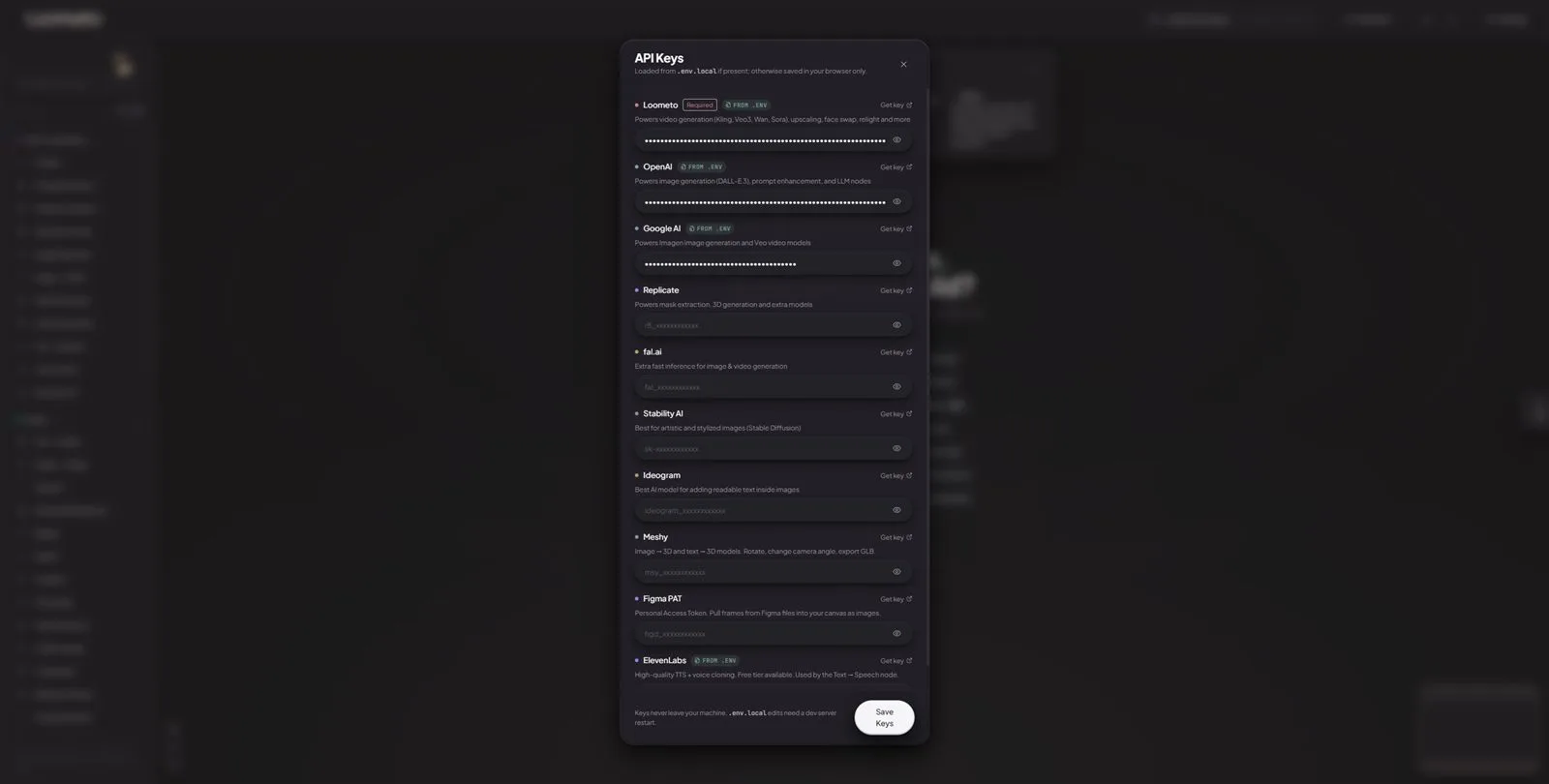
Paste, Save, generate. Keys never leave your machine.
Hit Setup Keys once, paste, press Save. Every provider works immediately, no config files, no restart. Each row explains what it powers and links straight to where you get the key.
- One required key. The rest are optional upgrades, the panel marks exactly which is which.
FROM .ENVchips. Using a.env.localfile instead? Those keys are detected, badge-marked, and always win over pasted ones.- Masked with reveal toggles. Every field ships hidden; per-row "Get key" links jump to the provider's key page.
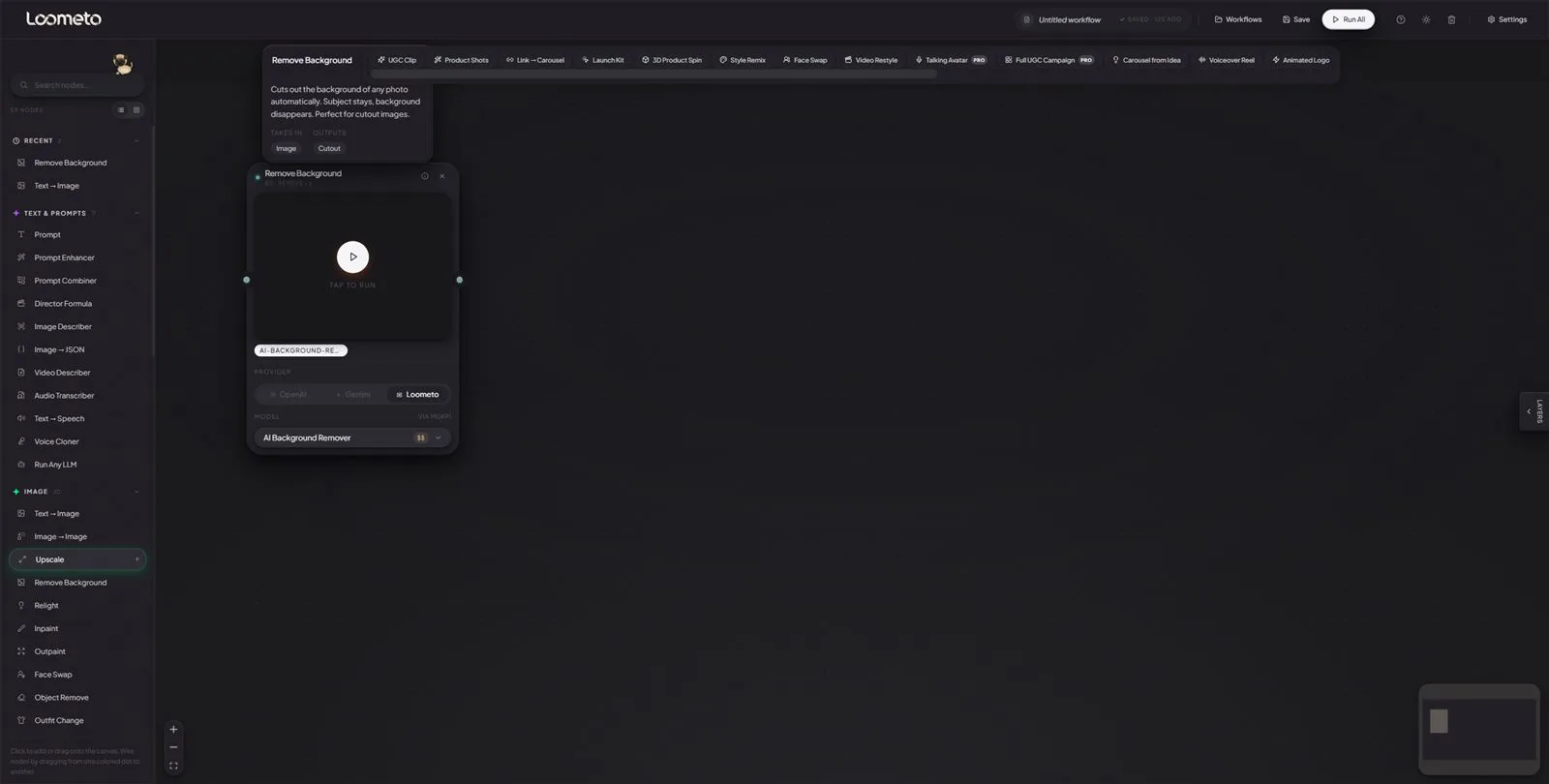
Every node explains itself in plain English.
Shown here: Remove Background. Tap the (i) on any of the 57 nodes and it tells you what it does, what it takes in, and what comes out, before you spend anything.
- Plain-English info. "Subject stays, background disappears. Perfect for cutout images." No jargon, no doc-hunting.
- Typed handles.
TAKES IN: Image→OUTPUTS: Cutout. Wires only connect where the types match, so mis-wiring is impossible. - Tap to run, per node. Run one node, a branch, or the whole graph. Outputs flow forward automatically.
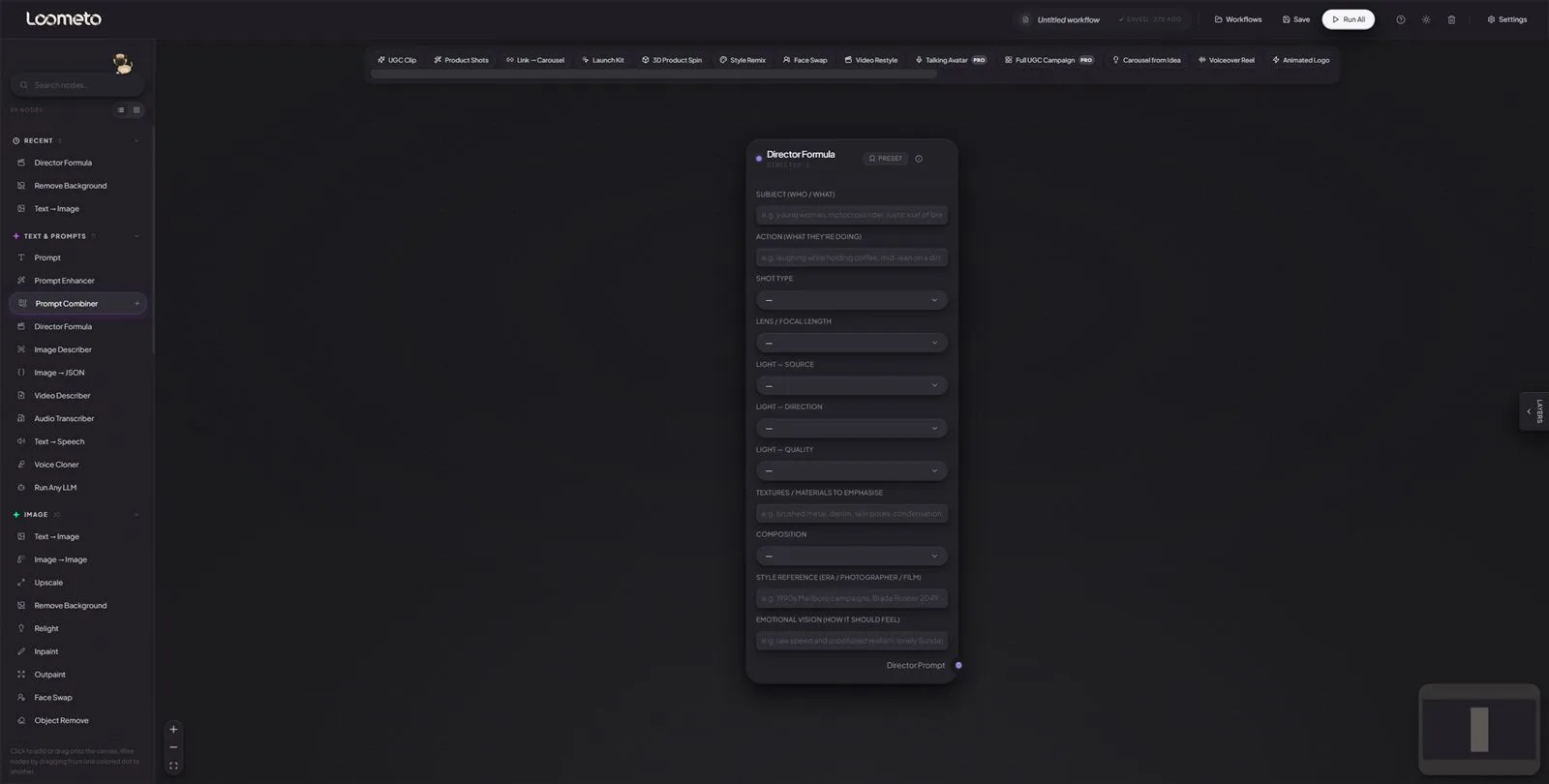
Prompt like a film director, not a prompt engineer.
The Director Formula node encodes real cinematography discipline: SHOT + LENS + LIGHT + TEXTURE + COMPOSITION + STYLE REF + VISION. Fill the fields like a creative brief; it assembles a director-grade prompt that wires into any generator.
- Real shot vocabulary. ECU → EWS shot codes, lens bands from 14mm ultra-wide to telephoto, each option annotated with the feeling it produces.
- Lighting in three facets. Source, direction, quality: the same split a DoP uses, as three dropdowns.
- Presets. Save a look you like and reapply it. The PRESET button banks the whole 11-field configuration.
- Part of a prompting suite. Prompt Enhancer, Prompt Combiner, Image Describer and Image → JSON sit beside it: a full prompt-intelligence toolkit, in nodes.
57 nodes, eight studios, one canvas.
Mix them freely. A board can feed a video node, which feeds an upscaler, which feeds the output.
Reference Boards
Lock a character, product or place once, reuse it across every shot for consistency no single prompt can give you.
Generate
The core generators: text or image in, image or video out, on whichever of the 276 models you pick.
Edit & Retouch
Surgical image ops without leaving the canvas: remove, replace, relight, upscale, swap outfits and faces.
Mask & Composite
Type what to mask and get an alpha. Grow mattes, merge channels, composite layers, pull video mattes.
Audio & Lip Sync
Voiceover, music and talking avatars: generate speech, clone a voice, transcribe, lip-sync it to video.
3D
Any image becomes a mesh. Orbit it inside the node, then export GLB for the web or a print-ready STL.
Prompt & LLM
Prompting help built in: enhance a rough idea, apply the director formula, describe an image, extract structured JSON.
Import, Output & Utility
Assets in, results out. Paste or upload media, pull a URL or a Figma frame, compare variants, batch with the iterator.
276 models across 10 categories. The whole market, one schema.
The catalog lives in public/muapi-schema.json. Every selector reads its allowed values from there. New model out today? Add one schema entry and it appears in the app. Cost tiers $ cheap · $$ medium · $$$ premium show on every model before you run it.
ROUTE ADirect provider
For providers you hold a key to: Google (Imagen, Veo, Gemini), OpenAI (GPT-Image, DALL·E), Meshy (3D), ElevenLabs (voice). Loometo calls them straight: raw cost, zero middleman markup.
ROUTE BMuAPI reseller
One MUAPI_API_KEY unlocks the other ~250 models (Kling, Sora, Runway, Wan, Flux, Tripo, Suno and more) without signing up to a dozen labs. lib/api/router.ts picks the route per model, automatically.
Six providers. One required. Paste it in the app and you're done.
The whole setup, in plain words: get a key from muapi.ai, open Loometo, hit Setup Keys (top right), paste it, press Save. That single key unlocks ~80% of the app. No config files, no restart, nothing else.
EASY WAYPaste in the app, works for all six
Setup Keys → paste → Save. The key is stored in your browser and sent only to your own localhost server, which forwards it to the provider. Works instantly for every provider below.
CONFIG WAY.env.local file, optional
Prefer keys in a file? Copy .env.example to .env.local, add the key, restart the dev server. Supported for MuAPI, Google and ElevenLabs. A file key always overrides a pasted one.
| Provider | What it powers | Get your key | Paste in-app | .env.local |
|---|---|---|---|---|
| MuAPIREQUIRED | Video, 3D, upscale, image edit, face swap, lip sync: the ~250-model reseller catalog | muapi.ai | ✓ works | ✓ MUAPI_API_KEY |
| Google AIOPTIONAL | Imagen 4, Veo 3, Gemini, called direct, bypassing reseller markup | aistudio.google.com/apikey | ✓ works | ✓ GOOGLE_API_KEY |
| ElevenLabsOPTIONAL | Text-to-speech + voice cloning (free tier available) | elevenlabs.io → API keys | ✓ works | ✓ ELEVENLABS_API_KEY |
| OpenAIOPTIONAL | GPT-Image / DALL·E, plus the LLM and prompt nodes | platform.openai.com/api-keys | ✓ works | — |
| MeshyOPTIONAL | Direct image → 3D, the cheapest 3D path | meshy.ai/api/keys | ✓ works | — |
| FigmaOPTIONAL | Pull frames and designs straight onto the canvas | figma.com → access tokens | ✓ works | — |
Where do keys actually live? Pasted keys stay in your browser's storage and travel only to localhost, your own machine, never to any Loometo server (there isn't one). Keys in .env.local never reach the browser at all.
Optional extra: set Cloudflare R2_* keys in .env.local and every generated asset is auto-copied to your own bucket. Provider URLs expire in 24 to 72 hours. This makes them permanent.
Connect your coding agent. Watch the canvas build itself.
Loometo ships a zero-dependency MCP server (mcp/loometo-mcp.mjs, Node 18+) wrapping its HTTP canvas bridge. Your agent reads the graph, adds nodes, wires them and fires runs, live, in your browser tab.
The 11 tools your agent gets
| snapshot | Read the canvas (nodes + edges), call first |
| add_node | Add a node by type → returns its id |
| connect | Wire source → target, by id or card name |
| set_param | Set prompt, model, aspect ratio via a patch |
| run_node / run_all | Fire one node or the whole graph |
| delete_node / clear | Remove a node / wipe the canvas |
| select / pulse | Highlight or flash nodes for the user |
| list_models | Valid model slugs + params per category |
Start Loometo, leave the tab open
That browser tab is what updates live while the agent works. First time here? Set your keys before the agent runs anything: Setup Keys → paste your MuAPI key → Save (see the API keys section), otherwise every run the agent fires will fail with a missing-key error.
npm run dev # serves on http://localhost:3005Register the MCP server in your agent
Use the absolute path to mcp/loometo-mcp.mjs. Set LOOMETO_URL only if you changed the port. Pick your client:
claude mcp add loometo \
  -- node \
  /abs/path/mcp/loometo-mcp.mjs
[mcp_servers.loometo]
command = "node"
args = ["/abs/path/mcp/
  loometo-mcp.mjs"]
{ "command": "node",
  "args": ["/abs/path/
mcp/loometo-mcp.mjs"] }"mcpServers": { "loometo": { "command": "node", "args": ["/abs/path/to/loometo/mcp/loometo-mcp.mjs"], "env": { "LOOMETO_URL": "http://localhost:3005" } } }
Just ask it to build
Reload your agent so it picks up the server, then talk in plain English. Nodes are addressable by the name on the card, you can literally say "run char-board-1".
No server running? Every tool returns a friendly "start Loometo first" instead of an error dump.
22 production-tested pipelines, one click each.
Every template is a pre-wired canvas: models pre-picked, prompts pre-filled with director-formula briefs you edit in place.
Running in four lines.
# clone, install, go
git clone https://github.com/…/loometo.git
cd loometo && npm install
npm run dev                 # → localhost:3005
# then in the app: Setup Keys → paste MuAPI key → Save
No database to provision, no Docker, no accounts, no config files. Node 18+ and one MuAPI key pasted in the app is the entire prerequisite list.
Repo layout.
app/
  api/proxy/     # key-holding provider proxies
  api/canvas/    # the agent bridge (HTTP + SSE)
  demo/[slug]/   # public read-only showcase
components/
  FlowCanvas.tsx  # the React Flow canvas
  nodes/         # all 57 node types
  ui/ sidebar/   # pills, pickers, panels
lib/
  api/           # dispatch, router, capabilities
  flow/          # templates, propagate, GLB→STL
  server/        # localhost + CSRF guard
mcp/            # zero-dep MCP server
public/
  muapi-schema.json # the 276-model catalog
LICENSE  NOTICE  TRADEMARK.md
Local-first, audited before release.
Loometo is built to run on your machine. The public repo shipped only after a security pass. These guards are already in the code.
Localhost-only API routes
Every proxy and canvas-bridge route rejects non-local requests with a 403. Nothing answers the outside world.
CSRF-hardened bridge
Mutating endpoints require application/json, forcing a failing preflight on any cross-origin attempt from a malicious page.
Zero telemetry
No analytics, no accounts, no database, no phone-home. Your prompts and assets stay on your machine (or your own R2 bucket).
Keys held server-side
.env.local keys are injected by server proxies and never reach the browser. In-app keys never leave your browser.
One honest caveat, stated in the README too: the dev server has no auth by design. Don't port-forward it to the public internet without adding your own auth layer.
Every node. Every model. Documented.
Pulled straight from the codebase: the same plain-English explanations behind each node's (i) button, and the full 276-entry model catalog with each model's extra parameters. Click a group to expand it.
All 57 nodes, in plain English
Text & Prompts8 nodes
| Node | What it does, from the (i) button |
|---|---|
| Prompt | Type what you want to create here. Like telling the AI 'make me a sunset on a beach'. It's the starting point of everything. |
| Prompt Enhancer | Your prompt goes in, a better prompt comes out. The AI rewrites it with more detail so your image or video looks amazing. |
| Audio Transcriber | Listens to your uploaded audio and writes out the spoken script. Feed the transcript into a Prompt Combiner so the video model knows what is being said, not just lip shapes. |
| Prompt Combiner | Connect two prompts and this merges them into one. Useful when you have different ideas you want to blend together. |
| Director Formula | Fill the 7 fields like a creative director writing a brief: subject + action, shot type, lens, lighting (3 facets), composition, style ref, vision. The node assembles a director-grade prompt that wires into any image generator. Vocabulary taken verbatim from cinematography sources. |
| Run Any LLM | Talk to any AI brain (ChatGPT, Gemini, Claude) directly inside your workflow. Ask questions, get descriptions, or have it write prompts. |
| Image Describer | Give it a photo and it tells you exactly what's in it as a detailed prompt. Perfect for recreating a style. |
| Image → JSON | Vision LLM produces a strict JSON description of one or several images of the same subject. Wire optional Extra Instructions (positive direction: 'include hex codes', 'list every logo separately') and Negative (avoid: 'don't speculate about brands not visible'). Output JSON wires into any text input for downstream identity lock. |
Audio & Voice5 nodes
| Node | What it does, from the (i) button |
|---|---|
| Text → Speech | Turns a script into a spoken audio clip. Wire a Prompt with your script in, get audio out. For ElevenLabs free tier, wire a Voice Cloner in (library voices are paid-only). Pipe that into Lip Sync to make a video character say it. |
| Voice Cloner | Wire in a 30+ second audio sample (your voice, a podcast clip, anything clean). Give it a name. Click Clone. ElevenLabs returns a voice_id you can wire into Text → Speech for unlimited future TTS in that voice. Free tier compatible. |
| Lip Sync | Upload a video of a person and an audio clip. It animates their lips to match the audio. |
| Speech → Video | Take a portrait photo, add a voice recording, and get a video of that person speaking. Perfect for AI avatars. |
| Upload Audio | Pick an audio file (mp3, wav). Feed it into Lip Sync or Speech → Video. |
Video7 nodes
| Node | What it does, from the (i) button |
|---|---|
| Video Describer | Same as Image Describer but for videos. Watches your video and writes out what's happening so you can recreate or remix it. |
| Text → Video | Type what you want to see and it creates a video. The dropdown shows only what each model truly supports. |
| Image → Video | Animate a single photo (First Frame), wire First + Last for transition (Veo 3.1), or wire multiple references for reference-conditioned models. Ref handle count is set by the chosen model: Sora 2 / Veo 3 base = 1, Pixverse = 2, Veo 3.1 Reference = 3, Wan 2.1 Reference = 5, Vidu Q1/Q2 + Kling O1 Reference = 7, Seedance Omni = 9. Address each in the prompt as @image1..@imageN. |
| Video → Video | Transform a video's look completely. 'Make this look like anime' or 'make it look like 1970s film.' Same motion, new style. |
| Video Upscale | Makes blurry or low-quality videos look sharp and crisp. |
| Video Matte | Removes the background from every frame of a video automatically. Tracks your subject, like a green screen without the green screen. |
| Upload Video | Pick a video file (mp4, mov, webm). Feed it into Video → Video, Lip Sync, or other video tools. |
3D1 nodes
| Node | What it does, from the (i) button |
|---|---|
| Image → 3D | Generate a 3D mesh from one image, multiple angle photos, or a text prompt. Tripo3D H31 ($0.20-$0.30) is the cheapest; Meshy 6 ($0.50) is most detailed. Drag the mesh to rotate. After the GLB loads, a 2D snapshot is auto-captured so downstream image nodes have a usable image to consume; download serves the .glb. |
Import, Output & Utility8 nodes
| Node | What it does, from the (i) button |
|---|---|
| Extract Frame | Grab any single frame from a video and save it as a still image. Pick the exact moment you want, frame by frame. |
| Painter | Brush directly on the canvas. Paint MASKS for Inpaint / Object Remove, or sketch overlays that flow downstream as images. |
| Import from Figma | Paste a Figma frame URL. Right-click any frame in Figma → Copy link to selection. Hit Run to pull it in as an image. |
| Upload Image | Pick an image from your computer. It becomes the starting point for any image workflow. |
| Import from URL | Paste any website link. Free mode extracts the readable text directly ($0). Google mode uses Gemini to clean the text AND recover the page's images and logo. Tap the recovered assets to pick which ones flow into your carousel as references. A tick marks the chosen ones. |
| Compare | Put two images side by side with a draggable slider. Perfect for before/after. |
| Iterator | Run the same process on multiple images at once. Instead of generating 10 images one by one, the Iterator does them in a batch. |
| Output | The finish line. Connect image, video, and/or audio here to preview and download each. Pair Veo video + TTS audio here, then combine in your editor (CapCut / DaVinci). |
Image & Boards28 nodes
| Node | What it does, from the (i) button |
|---|---|
| Text → Image | Type a description and it draws a picture. Models that accept a STYLE REFERENCE image (Nano Banana, Flux Kontext, GPT-Image) expose a second Style Ref handle. Pure T2I models hide it. |
| Image → Image | Give it a photo + a description and it transforms the photo. Like 'make this look like an oil painting.' |
| Upscale | Makes small or blurry images bigger and sharper. It actually invents new detail. Turn a tiny image into a crisp 4K masterpiece. |
| Remove Background | Cuts out the background of any photo automatically. Subject stays, background disappears. Perfect for cutout images. |
| Relight | Changes where the light is coming from in a photo. Make daytime look like sunset, or add dramatic studio lighting, without a studio. |
| Inpaint | Paint over something you don't want and the AI fills it in naturally. Remove people, erase logos. It blends in seamlessly. |
| Outpaint | Makes your image wider or taller by generating what would be outside the frame. Like zooming out. The AI imagines what's beyond the edges. |
| Face Swap | Put your face (or anyone's face) onto a different body or scene. Handles skin tone, lighting and angle automatically. |
| Object Remove | Point at anything and poof, it's gone. The AI fills in what the background looks like. Remove tourists, wires, anything. |
| Compositor | Visual layer editor. Wire a SCENE + up to 4 SUBJECTS, then drag / resize / reorder them in the polaroid. Two output modes: FLAT (exact pixel composite, no AI) or AI BLEND (sends the arrangement to Nano Banana Pro Edit which re-renders with matched lighting and perspective). |
| Reference Sheet | Feed up to 6 photos of the SAME thing (a person, a place, a product) and one prompt. The model uses them all as identity / location anchors. Better than asking one model to 'imagine four angles' from a single photo. |
| Character Board | Wire 1-5 photos of a person AND optionally a JSON spec from Image→JSON. Generates a studio model board (8 head expressions, 4 full-body angles, hand/eye/shoulder close-ups, fabric and skin-tone swatches) with anti-fake realism + director-formula lighting baked in. Feed the output into Image→JSON downstream to lock identity for compositors. |
| Location Board | Wire 1-5 photos of a place AND optionally a JSON spec. Generates a location reference board: exterior angles, time-of-day variants (golden/midday/blue/night), signage close-ups, brand swatches. Director-formula lens + 4-facet lighting baked per panel. Feed the output into Image→JSON downstream. |
| Product Board | Wire 1-5 photos of a product AND optionally a JSON spec. Generates a spec-board: hero angles, in-hand shots, brand-mark and material close-ups, colourway swatches. Director-formula lens + 4-facet softbox lighting baked per panel. Feed the output into Image→JSON downstream. |
| B-roll Board | Wire 1-5 photos of your scene / subject / product. Generates 6-9 cutaway-style frames sharing one colour grade and lighting era: hands, atmosphere details, environment beats, lifestyle moments. Use for video edit asset library or campaign supporting shots. |
| Storyboard | Wire 1-5 photos of your character / scene / setting + an extra-direction line describing the story beat-by-beat. Generates 6-9 numbered panels, each labelled with shot type (ECU / CU / MS / FS / LS) and a one-line action. Photoreal hero frames at pre-vis quality. |
| Mascot Board | Wire 1-5 photos / concept art of a brand mascot. Generates a mascot bible: 4 orthographic views (front / 3-4 / side / back), 6 expressions, 4-5 poses, brand palette swatches, face + hand detail callouts, scale reference next to a human. Locks the mascot for consistent reuse across campaigns. |
| Creature Board | Wire 1-5 photos / concept art of a creature, monster, or designed animal. Generates a creature concept-art bible: 5 orthographic views (front / 3-4 / side / back / top-down), face / limb / signature-feature / texture / joint detail callouts, material swatches (skin / fur / scales / feathers), threat-display + resting + hunting pose silhouettes, scale reference next to a human. |
| Inter Change | Virtually try on different outfits. Describe the clothing and the AI puts it on the person. Great for fashion and e-commerce. |
| Crop | Cut your image or video to a specific size. Choose 16:9 for YouTube, 9:16 for TikTok, or 1:1 for Instagram. Instant, no AI needed. |
| Blur | Makes things fuzzy. Blur backgrounds, censor things, or create a dreamy soft-focus effect. Slide to control how blurry. |
| Levels | Make your image brighter, darker, or more contrasty. Like the basic sliders in your phone's photo editor but in your workflow. |
| Invert | Flips all colors to their opposite, like a photo negative. Black becomes white. Very useful for flipping masks. |
| Mask Extractor | Click on objects in your image and it automatically traces around them. Magic scissors that cut out exactly what you want. |
| Mask by Text | Describe what to select, 'the person's hair' or 'the car', and it draws the selection automatically. No clicking needed. |
| Matte Grow/Shrink | Makes your selection slightly bigger or smaller. Use this to clean up rough edges. |
| Merge Alpha | Takes your image and your mask and combines them. The masked area becomes transparent. How you get cutout images with no background. |
| Carousel Board | Turns any text (wire in an Import from URL, or paste directly) into a ready-to-post social carousel: hook slide, point slides, CTA slide. Wire a Logo in to brand every slide and a Reference Image for the hook background. Finish 'Flat' renders locally for free; 'AI Enhance' passes each slide through Nano Banana Pro Edit (~$0.12/slide). One output handle per slide. |
The full model index, all 276
Image to Video62 models
| Model slug | Variant | Extra parameters |
|---|---|---|
| ai-video-effects | AI Video Effects effects | name, aspect_ratio, resolution, quality |
| motion-controls | Motion Controls effects | name, aspect_ratio, resolution, quality |
| vfx | VFX effects | name, aspect_ratio, resolution, quality |
| veo3-image-to-video | Image to Video veo | images_list, aspect_ratio |
| veo3-fast-image-to-video | Image to Video [Fast] veo | images_list, aspect_ratio |
| runway-image-to-video | Image to Video runway | aspect_ratio, resolution, duration |
| wan2.1-image-to-video | Image to Video wan2.1 | aspect_ratio, resolution, quality, duration |
| midjourney-v7-image-to-video | Image to Video midjourney | aspect_ratio, resolution, num_videos, variety |
| hunyuan-image-to-video | Image to Video hunyuan | aspect_ratio |
| seedance-2.0-omni-reference | Seedance 2.0 Omni Reference bytedance | images_list, aspect_ratio, quality, duration |
| seedance-2-vip-omni-reference-fast | Seedance 2 VIP Omni Reference Fast bytedance | images_list, aspect_ratio, duration |
| seedance-lite-i2v | Lite Image to Video bytedance | last_image, resolution, duration, camera_fixed |
| seedance-pro-i2v | Pro Image to Video bytedance | resolution, duration, camera_fixed |
| kling-v2.1-master-i2v | Master Image to Video kling-v2.1 | aspect_ratio, duration |
| kling-v2.1-standard-i2v | Standard Image to Video kling-v2.1 | aspect_ratio, duration |
| kling-v2.1-pro-i2v | Pro Image to Video kling-v2.1 | last_image, aspect_ratio, duration |
| wan2.2-image-to-video | Image to Video wan2.2 | last_image, aspect_ratio, resolution, quality |
| runway-act-two-i2v | Act 2 Image to Video runway | reference_video_url, aspect_ratio |
| pixverse-v4.5-i2v | Image to Video pixverse-v4.5 | images_list, aspect_ratio, resolution, duration |
| vidu-v2.0-i2v | Image to Video vidu-v2 | images_list, aspect_ratio, resolution, duration |
| vidu-q1-reference | Reference I2V vidu-q1 | images_list, aspect_ratio |
| minimax-hailuo-02-standard-i2v | Standard I2V minimax-2 | end_image_url, duration, resolution |
| minimax-hailuo-02-pro-i2v | Pro I2V minimax-2 | end_image_url, duration, resolution |
| video-effects | Video Effects effects | name |
| pixverse-v5-i2v | Image to Video pixverse-v5 | images_list, aspect_ratio, resolution, duration |
| seedance-lite-reference-video | Lite Reference to Video bytedance | images_list, resolution, duration |
| wan2.1-reference-video | Reference to Video wan2.1 | images_list, resolution, aspect_ratio, duration |
| kling-v2.5-turbo-pro-i2v | Pro Image to Video kling-v2.5 | duration |
| wan2.5-image-to-video | Image to Video wan2.5 | resolution, duration |
| wan2.5-image-to-video-fast | Image to Video (Fast) wan2.5 | resolution, duration |
| openai-sora-2-image-to-video | Sora 2 Image to Video sora | images_list, aspect_ratio, duration, remove_watermark |
| ovi-image-to-video | Image to Video ovi | prompt only |
| openai-sora-2-pro-image-to-video | Sora 2 Pro Image to Video sora | images_list, aspect_ratio, duration, resolution |
| leonardoai-motion-2.0 | Motion 2.0 I2V leonardoai | aspect_ratio |
| higgsfield-dop-image-to-video | Image to Video higgsfield | last_image, motion, strength, options |
| veo3.1-image-to-video | Image to Video veo3.1 | last_image, aspect_ratio, duration, resolution |
| veo3.1-fast-image-to-video | Image to Video [Fast] veo3.1 | last_image, aspect_ratio, duration, resolution |
| veo3.1-reference-to-video | Reference to Video veo3.1 | images_list, resolution, duration, generate_audio |
| seedance-pro-i2v-fast | Pro Image to Video Fast bytedance | resolution, duration, camera_fixed |
| ltx-2-pro-image-to-video | Pro Image to Video ltx | duration, generate_audio |
| ltx-2-fast-image-to-video | Fast Image to Video ltx | duration, generate_audio |
| vidu-q2-reference | Reference I2V vidu-q2 | images_list, resolution, aspect_ratio, duration |
| vidu-q2-turbo-start-end-video | Turbo I2V vidu-q2 | last_image, resolution, duration, bgm |
| vidu-q2-pro-start-end-video | Pro I2V vidu-q2 | last_image, resolution, duration, bgm |
| minimax-hailuo-2.3-pro-i2v | Pro I2V minimax-2.3 | resolution |
| minimax-hailuo-2.3-standard-i2v | Standard I2V minimax-2.3 | duration |
| minimax-hailuo-2.3-fast | Fast I2V minimax-2.3 | duration, go_fast |
| kling-v2.5-turbo-std-i2v | Standard Image to Video kling-v2.5 | duration |
| grok-imagine-image-to-video | Image to Video grok | images_list, mode, duration |
| kling-o1-image-to-video | Image to Video [Pro] kling-o1 | last_image, aspect_ratio, duration |
| kling-o1-reference-to-video | Reference to Video [Pro] kling-o1 | images_list, aspect_ratio, duration, keep_original_sound |
| kling-v2.6-pro-i2v | Image to Video kling-v2.6 | duration, sound |
| pixverse-v5.5-i2v | Image to Video pixverse-v5.5 | images_list, style, thinking, aspect_ratio |
| wan2.2-spicy-image-to-video | Spicy Image to Video wan2.2 | resolution, duration |
| wan2.6-image-to-video | Image to Video wan2.6 | resolution, duration, shot_type |
| kling-o1-standard-image-to-video | Image to Video [Standard] kling-o1 | last_image, duration |
| kling-o1-standard-reference-to-video | Reference to Video [Standard] kling-o1 | images_list, aspect_ratio, duration |
| seedance-v1.5-pro-i2v | Image to Video seedance-v1.5-pro | last_image, aspect_ratio, resolution, duration |
| seedance-v1.5-pro-i2v-fast | Image to Video [Fast] seedance-v1.5-pro | last_image, aspect_ratio, resolution, duration |
| ltx-2-19b-image-to-video | Std Image to Video ltx | resolution, duration |
| kling-v3.0-pro-image-to-video | Image to Video [Pro] kling-v3.0 | last_image, duration, generate_audio |
| kling-v3.0-standard-image-to-video | Image to Video [standard] kling-v3.0 | last_image, duration, generate_audio |
Text to Video44 models
| Model slug | Variant | Extra parameters |
|---|---|---|
| veo3-text-to-video | Text to Video veo | aspect_ratio |
| veo3-fast-text-to-video | Text to Video [Fast] veo | aspect_ratio |
| runway-text-to-video | Text to Video runway | aspect_ratio, resolution, duration |
| wan2.1-text-to-video | Text to Video wan2.1 | aspect_ratio, resolution, quality, duration |
| hunyuan-text-to-video | Text to Video hunyuan | aspect_ratio |
| hunyuan-fast-text-to-video | Fast Text to Video hunyuan | aspect_ratio |
| seedance-lite-t2v | Lite Text to Video bytedance | aspect_ratio, resolution, duration, camera_fixed |
| seedance-pro-t2v | Pro Text to Video bytedance | aspect_ratio, resolution, duration, camera_fixed |
| kling-v2.1-master-t2v | Master Text to Video kling-v2.1 | aspect_ratio, duration |
| wan2.2-text-to-video | Text to Video wan2.2 | aspect_ratio, resolution, quality, duration |
| pixverse-v4.5-t2v | Text to Video pixverse-v4.5 | aspect_ratio, resolution, duration |
| vidu-v2.0-t2v | Text to Video vidu-v2 | aspect_ratio, resolution, duration |
| wan2.2-5b-fast-t2v | Fast Text to Video wan2.2 | aspect_ratio, resolution |
| minimax-hailuo-02-standard-t2v | Standard T2V minimax-2 | duration, resolution |
| minimax-hailuo-02-pro-t2v | Pro T2V minimax-2 | duration, resolution |
| pixverse-v5-t2v | Text to Video pixverse-v5 | aspect_ratio, resolution, duration |
| kling-v2.5-turbo-pro-t2v | Pro Text to Video kling-v2.5 | aspect_ratio, duration |
| wan2.5-text-to-video | Text to Video wan2.5 | aspect_ratio, resolution, duration |
| wan2.5-text-to-video-fast | Text to Video (Fast) wan2.5 | aspect_ratio, resolution, duration |
| openai-sora | Sora Text to Video sora | aspect_ratio, resolution |
| openai-sora-2-text-to-video | Sora 2 Text to Video sora | aspect_ratio, duration, remove_watermark |
| ovi-text-to-video | Text to Video ovi | aspect_ratio |
| openai-sora-2-pro-text-to-video | Sora 2 Pro Text to Video sora | aspect_ratio, duration, resolution, remove_watermark |
| veo3.1-text-to-video | Text to Video veo3.1 | aspect_ratio, duration, resolution |
| veo3.1-fast-text-to-video | Text to Video [Fast] veo3.1 | aspect_ratio, duration, resolution |
| openai-sora-2-pro-storyboard | Sora 2 Pro Storyboard sora | shots, duration, images_list, aspect_ratio |
| veo3.1-extend-video | Extend Video veo3.1 | request_id |
| seedance-pro-t2v-fast | Pro Text to Video Fast bytedance | resolution, duration, aspect_ratio, camera_fixed |
| ltx-2-pro-text-to-video | Pro Text to Video ltx | duration, generate_audio |
| ltx-2-fast-text-to-video | Fast Text to Video ltx | duration, generate_audio |
| minimax-hailuo-2.3-pro-t2v | Pro T2V minimax-2.3 | resolution |
| minimax-hailuo-2.3-standard-t2v | Standard T2V minimax-2.3 | duration |
| grok-imagine-text-to-video | Text to Video grok | aspect_ratio, mode, duration |
| kling-o1-text-to-video | Text to Video [Pro] kling-o1 | aspect_ratio, duration |
| kling-v2.6-pro-t2v | Text to Video kling-v2.6 | aspect_ratio, duration, sound |
| pixverse-v5.5-t2v | Text to Video pixverse-v5.5 | style, thinking, aspect_ratio, resolution |
| wan2.6-text-to-video | Text to Video wan2.6 | aspect_ratio, resolution, duration, shot_type |
| seedance-v1.5-pro-t2v | Text to Video seedance-v1.5-pro | aspect_ratio, resolution, duration, generate_audio |
| seedance-v1.5-pro-t2v-fast | Text to Video [Fast] seedance-v1.5-pro | aspect_ratio, resolution, duration, generate_audio |
| ltx-2-19b-text-to-video | Std Text to Video ltx | aspect_ratio, resolution, duration |
| veo3.1-4k-video | 4k Video veo3.1 | request_id |
| kling-v3.0-pro-text-to-video | Text to Video [Pro] kling-v3.0 | aspect_ratio, duration, generate_audio |
| kling-v3.0-standard-text-to-video | Text to Video [standard] kling-v3.0 | aspect_ratio, duration, generate_audio |
| seedance-v2.0-t2v | Seedance 2.0 bytedance | aspect_ratio, duration, quality |
Image to Image56 models
| Model slug | Variant | Extra parameters |
|---|---|---|
| ai-image-upscaler | Image Upscaler tools | prompt only |
| ai-image-face-swap | Image Faceswap tools | swap_url, target_index |
| ai-dress-change | Dress Change tools | model_image_url, garment_image_url |
| ai-background-remover | Background Remover tools | prompt only |
| ai-product-shot | Product Shot tools | scene_description |
| ai-skin-enhancer | Skin Enhancer tools | prompt only |
| ai-color-photo | Color Photo tools | prompt only |
| flux-kontext-dev-i2i | Kontext Dev I2I kontext | images_list, aspect_ratio, num_images |
| ai-product-photography | Product Photography tools | person_image_url, product_image_url |
| ai-ghibli-style | Ghibli Style tools | prompt only |
| ai-image-extension | Image Extension tools | prompt only |
| ai-object-eraser | Object Eraser tools | mask_image_url |
| flux-kontext-pro-i2i | Kontext Pro I2I kontext | images_list, aspect_ratio |
| flux-kontext-max-i2i | Kontext Max I2I kontext | images_list, aspect_ratio |
| gpt4o-image-to-image | Image to Image gpt | images_list, aspect_ratio, num_images |
| gpt4o-edit | Edit Image gpt | mask_image_url, aspect_ratio, num_images |
| midjourney-v7-image-to-image | Image to Image midjourney | speed, aspect_ratio, variety, stylization |
| gpt-image-2-image-to-image | GPT Image 2 (Image to Image) openai | images_list, aspect_ratio, resolution, quality |
| bytedance-seededit-v3 | Edit Image v3 seedream | prompt only |
| midjourney-v7-style-reference | Style Reference midjourney | speed, aspect_ratio, variety, stylization |
| midjourney-v7-omni-reference | Omni Reference midjourney | speed, aspect_ratio, weight, variety |
| minimax-image-01-subject-reference | Subject Reference minimax | aspect_ratio, num_images |
| ideogram-character | Character ideogram | render_speed, style, aspect_ratio, num_images |
| flux-pulid | Pulid Image to Image flux | aspect_ratio |
| qwen-image-edit | Edit Image qwen | aspect_ratio |
| image-effects | Image Effects effects | name |
| nano-banana-edit | Edit Image nano | images_list, aspect_ratio |
| ideogram-v3-reframe | v3 Reframe ideogram | aspect_ratio, render_speed, style, num_images |
| bytedance-seedream-edit-v4 | Edit Image v4 seedream | images_list, aspect_ratio, resolution, num_images |
| nano-banana-effects | Image Effects nano | name, aspect_ratio |
| flux-kontext-effects | Image Effects kontext | name |
| flux-redux | Redux Image to Image flux | aspect_ratio, num_images |
| qwen-image-edit-plus | Edit Image Plus qwen | images_list, width, height |
| wan2.5-image-edit | Edit Image wan2.5 | images_list, width, height |
| higgsfield-soul-image-to-image | Image to Image higgsfield | style, aspect_ratio, strength, quality |
| reve-image-edit | Edit Image reve | prompt only |
| topaz-image-upscale | Image Upscale topaz | upscale_factor |
| seedvr2-image-upscale | Image Upscale seedvr2 | resolution |
| qwen-image-edit-plus-lora | Edit Image Plus Lora qwen | images_list, rotate_right_left, move_forward, vertical_angle |
| nano-banana-pro-edit | Pro Edit Image nano | images_list, aspect_ratio, resolution |
| image-passthrough | Image to Image image | make_input |
| kling-o1-edit-image | Edit Image [Pro] kling-o1 | images_list, aspect_ratio, resolution |
| flux-2-dev-edit | Edit Image [Dev] flux-2 | images_list, width, height |
| flux-2-flex-edit | Edit Image [Flex] flux-2 | images_list, aspect_ratio, resolution |
| flux-2-pro-edit | Edit Image [Pro] flux-2 | images_list, aspect_ratio, resolution |
| vidu-q2-reference-to-image | Reference to Image vidu-q2 | images_list, aspect_ratio, resolution |
| bytedance-seedream-v4.5-edit | Edit Image seedream-v45 | images_list, aspect_ratio, quality |
| qwen-image-edit-2511 | Edit Image 2511 qwen | images_list, width, height |
| wan2.6-image-edit | Edit Image wan2.6 | images_list |
| qwen-text-to-image-2512 | Text to Image 2512 qwen | width, height |
| gpt-image-1.5-edit | Image to Image gpt-1.5 | images_list, aspect_ratio, quality |
| grok-imagine-image-to-image | Image to Image grok | prompt only |
| Api Node | Image to Image wavespeed | model_url, api_key, params |
| flux-2-klein-4b-edit | Edit Image [Klein 4B] flux-2 | images_list, aspect_ratio |
| flux-2-klein-9b-edit | Edit Image [Klein 9B] flux-2 | images_list, aspect_ratio |
| add-image-watermark | Add Image Watermark watermark | watermark_image_url, position, opacity, scale |
Video to Video27 models
| Model slug | Variant | Extra parameters |
|---|---|---|
| ai-video-face-swap | Video Faceswap tools | target_gender, target_index |
| mmaudio-v2-video-to-video | v2 Video to Video mmaudio | duration |
| runway-act-two-v2v | Act 2 Video to Video runway | reference_video_url, aspect_ratio |
| runway-aleph-v2v | Aleph Video to Video runway | aspect_ratio |
| luma-modify-video | Modify V2V luma | prompt only |
| luma-flash-reframe | Flash Reframe V2V luma | aspect_ratio, duration |
| ai-dance-effects | AI Dance Effects effects | resolution |
| infinitetalk-video-to-video | Audio to Video infinite-talk | resolution |
| ai-video-upscaler | Video Upscaler tools | resolution, copy_audio |
| wan2.2-edit-video | Edit Video wan2.2 | resolution |
| heygen-video-translate | Video Translate tools | language |
| wan2.2-animate | Anime Video wan2.2 | mode, resolution |
| topaz-video-upscale | Video Upscale topaz | upscale_factor |
| ai-video-upscaler-pro | Video Upscaler Pro tools | resolution |
| video-watermark-remover | Watermark Remover tools | prompt only |
| remix-video | Remix Video tools | aspect_ratio |
| video-passthrough | Video to Video video | make_input |
| kling-o1-video-edit | Edit Video [Pro] kling-o1 | images_list, aspect_ratio, keep_original_sound |
| kling-o1-video-edit-fast | Edit Video Fast [Pro] kling-o1 | images_list, aspect_ratio, keep_original_sound |
| wan2.2-spicy-video-extend | Spicy Video Extend wan2.2 | resolution, duration |
| kling-o1-standard-video-edit | Edit Video [Standard] kling-o1 | images_list, keep_original_sound |
| kling-v2.6-pro-motion-control | Pro Motion Control kling-v2.6 | prompt only |
| seedance-v1.5-pro-video-extend | Video Extend seedance-v1.5-pro | resolution, duration, generate_audio, camera_fixed |
| seedance-v1.5-pro-video-extend-fast | Video Extend [Fast] seedance-v1.5-pro | resolution, duration, generate_audio, camera_fixed |
| kling-v2.6-std-motion-control | Std Motion Control kling-v2.6 | prompt only |
| add-video-watermark | Add Video Watermark watermark | watermark_image_url, position, opacity, scale |
| ai-clipping | AI Clipping video | num_highlights, aspect_ratio, return_coordinates_only |
Text to Audio8 models
| Model slug | Variant | Extra parameters |
|---|---|---|
| mmaudio-v2-text-to-audio | v2 Text to Audio mmaudio | duration |
| suno-create-music | Create Music suno | style, model, instrumental, negative_tags |
| suno-remix-music | Remix Music suno | style, model, instrumental, negative_tags |
| suno-extend-music | Extend Music suno | style, model, continue_at, instrumental |
| minimax-voice-clone | Voice Clone minimax-2.3 | custom_voice_id, model, need_noise_reduction, need_volume_normalization |
| minimax-speech-2.6-hd | Speech HD minimax-2.6 | voice_id, speed, volume, pitch |
| minimax-speech-2.6-turbo | Speech Turbo minimax-2.6 | voice_id, speed, volume, pitch |
| audio-passthrough | Text to Audio audio | make_input |
Text to Image47 models
| Model slug | Variant | Extra parameters |
|---|---|---|
| flux-dev | Dev flux | width, height, num_images |
| flux-kontext-dev-t2i | Kontext Dev T2I kontext | aspect_ratio, num_images |
| hidream-i1-fast | Fast hidream | width, height, num_images |
| hidream-i1-dev | Dev hidream | width, height, num_images |
| hidream-i1-full | Full hidream | width, height, num_images |
| ai-anime-generator | Anime Generator tools | width, height |
| wan2.1-text-to-image | Text to Image wan2.1 | width, height |
| flux-kontext-pro-t2i | Kontext Pro T2I kontext | aspect_ratio |
| flux-kontext-max-t2i | Kontext Max T2I kontext | aspect_ratio |
| gpt4o-text-to-image | Text to Image gpt | aspect_ratio, num_images |
| midjourney-v7-text-to-image | Text to Image midjourney | speed, aspect_ratio, variety, stylization |
| flux-schnell | Schnell flux | width, height, num_images |
| gpt-image-2-text-to-image | GPT Image 2 (Text to Image) openai | aspect_ratio, resolution, quality |
| bytedance-seedream-v3 | Text to Image v3 seedream | aspect_ratio |
| qwen-image | Text to Image qwen | aspect_ratio, num_images |
| ideogram-v3-t2i | v3 Text to Image ideogram | render_speed, style, aspect_ratio, num_images |
| nano-banana | Text to Image nano | aspect_ratio |
| google-imagen4 | Imagen 4 | aspect_ratio, num_images |
| google-imagen4-fast | Imagen 4 Fast | aspect_ratio, num_images |
| google-imagen4-ultra | Imagen 4 Ultra | aspect_ratio |
| sdxl-image | Text to Image sdxl | width, height |
| bytedance-seedream-v4 | Text to Image v4 seedream | aspect_ratio, resolution, num_images |
| hunyuan-image-2.1 | Text to Image v2.1 hunyuan | width, height |
| chroma-image | Text to Image chroma | width, height |
| flux-krea-dev | Krea Dev flux | aspect_ratio, num_images |
| perfect-pony-xl | Text to Image pony | width, height |
| neta-lumina | Text to Image neta | width, height |
| wan2.5-text-to-image | Text to Image wan2.5 | width, height |
| hunyuan-image-3.0 | Text to Image v3.0 hunyuan | width, height |
| leonardoai-phoenix-1.0 | Phoenix 1.0 T2I leonardoai | aspect_ratio |
| leonardoai-lucid-origin | Lucid Origin T2I leonardoai | aspect_ratio |
| reve-text-to-image | Text to Image reve | aspect_ratio |
| grok-imagine-text-to-image | Text to Image grok | aspect_ratio |
| nano-banana-pro | Text to Image Pro nano | aspect_ratio, resolution |
| kling-o1-text-to-image | Text to Image [Pro] kling-o1 | aspect_ratio, resolution, num_images |
| z-image-turbo | Text to Image Turbo z-image | width, height |
| flux-2-dev | Text to Image [Dev] flux-2 | width, height |
| flux-2-flex | Text to Image [Flex] flux-2 | aspect_ratio, resolution |
| flux-2-pro | Text to Image [Pro] flux-2 | aspect_ratio, resolution |
| vidu-q2-text-to-image | Text to Image vidu-q2 | aspect_ratio, resolution |
| bytedance-seedream-v4.5 | Text to Image seedream-v45 | aspect_ratio, quality |
| gpt-image-1.5 | Text to Image gpt-1.5 | aspect_ratio, quality |
| wan2.6-text-to-image | Text to Image wan2.6 | width, height |
| flux-2-klein-4b | Text to Image [Klein 4B] flux-2 | aspect_ratio |
| flux-2-klein-9b | Text to Image [Klein 9B] flux-2 | aspect_ratio |
| z-image-base | Text to Image Base z-image | aspect_ratio, strength |
| seedream-5.0 | Seedream 5.0 bytedance | prompt only |
Training4 models
| Model slug | Variant | Extra parameters |
|---|---|---|
| flux-dev-lora | Dev LoRA flux | model_id, width, height, num_images |
| wan2.1-lora-i2v | Image to Video (LoRA) wan2.1 | lora_list, aspect_ratio, resolution, quality |
| wan2.1-lora-t2v | Text to Video (LoRA) wan2.1 | lora_list, aspect_ratio, resolution, quality |
| sdxl-lora | LoRA sdxl | lora_list, width, height |
Audio to Video11 models
| Model slug | Variant | Extra parameters |
|---|---|---|
| sync-lipsync | sync lipsync | prompt only |
| latent-sync | latent lipsync | prompt only |
| creatify-lipsync | Creatify lipsync | prompt only |
| veed-lipsync | Veed lipsync | prompt only |
| wan2.2-speech-to-video | Audio to Video wan2.2 | resolution |
| infinitetalk-image-to-video | Image to Video infinite-talk | resolution |
| kling-v1-avatar-standard | Standard A2V kling-v1 | prompt only |
| kling-v1-avatar-pro | Pro A2V kling-v1 | prompt only |
| kling-v2-avatar-standard | Standard A2V kling-v2 | prompt only |
| kling-v2-avatar-pro | Pro A2V kling-v2 | prompt only |
| ltx-2-19b-lipsync | Audio to Video ltx | resolution |
Text to Text8 models
| Model slug | Variant | Extra parameters |
|---|---|---|
| gpt-5-nano | GPT5 Nano Text gpt | prompt only |
| sora2-storyboard | Storyboard sora2 | duration |
| gpt-5-mini | GPT5 Mini Text gpt | prompt only |
| text-passthrough | Text to Text text | make_input |
| any-llm | Text to Text llm | system_prompt, model, reasoning, priority |
| openrouter-vision | Image to Text llm | images_list, system_prompt, model, reasoning |
| agentic-architect | Architect workflow | prompt only |
| agent-chat | Agent Chat infra | message, conversation_id |
Image to 3D9 models
| Model slug | Variant | Extra parameters |
|---|---|---|
| meshy-6-image-to-3d | Image to 3D meshy | should_texture, topology, target_polycount, should_remesh |
| meshy-6-multi-image-to-3d | Image to 3D meshy | images_list, should_texture, topology, target_polycount |
| meshy-6-text-to-3d | Image to 3D meshy | mode, topology, target_polycount, should_remesh |
| tripo3d-h31-image-to-3d | Image to 3D tripo3d | texture, texture_quality, geometry_quality, pbr |
| tripo3d-h31-multiview-to-3d | Image to 3D tripo3d | images_list, texture, texture_quality, geometry_quality |
| tripo3d-h31-text-to-3d | Image to 3D tripo3d | texture, texture_quality, geometry_quality, pbr |
| tripo3d-p1-image-to-3d | Image to 3D tripo3d | texture, face_limit |
| tripo3d-p1-text-to-3d | Image to 3D tripo3d | texture, face_limit |
| meshy-image-to-3d | Image to 3D (Meshy direct) meshy | prompt only |
Why Loometo, and not the others.
| Loometo | ComfyUI | Vibe-Workflow | Runway | |
|---|---|---|---|---|
| Visual node canvas | ✓ | ✓ | ✓ | ✕ |
| Your coding agent builds it (MCP) | ✓ | ✕ | ✕ | ✕ |
| Audio, voice clone & lip sync | ✓ | partial | ✕ | partial |
| Image → 3D with STL / GLB export | ✓ | ✕ | ✕ | ✕ |
| Model-agnostic (276, one key) | ✓ | local weights | a few | own models |
| Bring your own keys, pay at cost | ✓ | free / local | — | subscription |
| Runs 100% local, no telemetry | ✓ | ✓ | — | ✕ cloud |
| Ready-made templates | 22 | ✕ | a few | presets |
| In-app cost labels before you run | ✓ | n/a | ✕ | credits |
Positioning, not a takedown: ComfyUI runs local model weights; Vibe-Workflow is a lighter node builder; Runway is a closed model lab. Loometo is the open orchestration layer over everyone's models.
Open code. Protected brand. The Firefox model.
The same approach Firefox and Chromium use: take the code and do anything with it, just don't ship it as "Loometo."
Code APACHE-2.0
- Use, copy, modify, redistribute
- Commercial use: sell it, build a business on it
- Fork it, run it for clients, ship products on it
- Say it's "built on Loometo", factual reference is fine
Brand TRADEMARK · RESERVED
- Don't name your fork "Loometo" or a lookalike
- Don't reuse the Loometo logo or brand as your own
- Don't imply your version is official or endorsed
- Keep the NOTICE file: credit to Dinimiciuil Labs travels with the code